Set up coaching templates in Google Sheets: import CSVs, organise client files, check formulas and build a weekly review routine.
Need the files first? Browse free Google Sheets templates for coaches. Preview the layouts there and request the starter CSV downloads. This guide explains how to set them up and use them.
Set up your templates in Google Sheets
- Choose the layouts you need from the template library: training, nutrition, check-ins or client tracking.
- Create a private Google Sheet. Use File → Import → Upload to import each CSV as a separate tab.
- Check the imported values and formula text. CSV files do not include the finished formatting, checkboxes or charts. Add those in Sheets and test formulas with sample data before using client records.
- Keep a clean master file. Make a separate working copy for each client, and keep your coach-only roster in a separate file.
- Share only the relevant client file. Check access permissions, then test the layout on a phone and complete a sample weekly review.
The sections below explain how to use five layouts. The first four map to areas included in the paid GSheetsPro system. The field lists and formulas are DIY examples; the free CSVs are starter layouts. Section 5 is a DIY business analytics extension, not part of the listed £199 system.
1. Client Management Dashboard
Start with the client tracking spreadsheet layout.
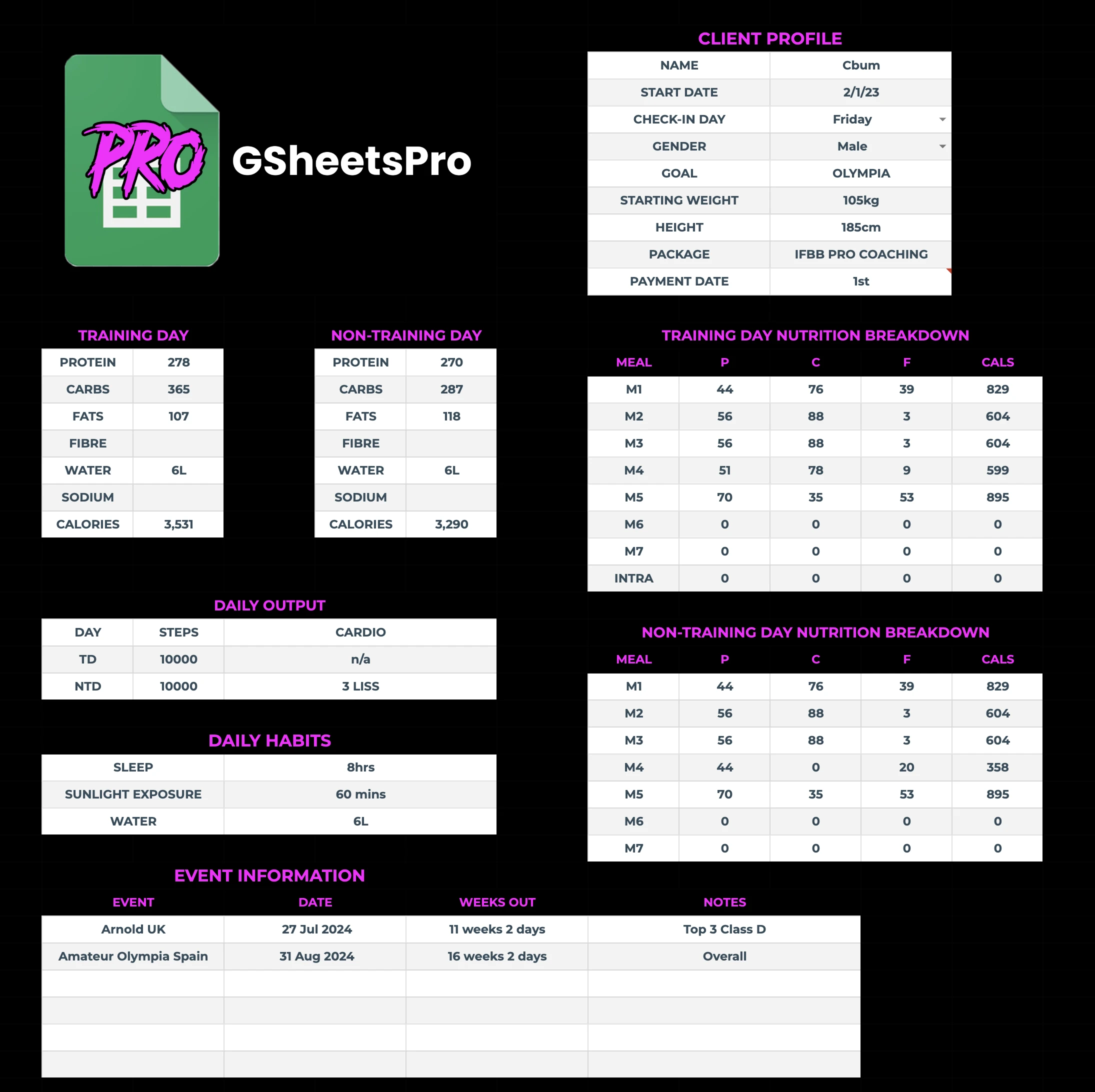
Included in GSheetsPro: A client management dashboard and weekly progress tracker. The feature list covers client details, check-in schedules, notes, payments and coaching priorities in one view.
If you build it yourself: Use a single-view command centre that shows every active client's status, contract dates, compliance scores and next action items without opening each individual file.
Why you need it: When you are managing 20+ clients, you cannot afford to click into each person's sheet to figure out who needs attention. A dashboard surfaces the critical information so you can plan which reviews need attention.
Example fields and formulas:
- Columns: Client Name, Start Date, Contract End Date, Package Tier, Check-In Compliance (%), Current Goal, Status (Active / Paused / At Risk), Last Contact Date, Next Action
- Key formulas: Use
COUNTIFto calculate compliance rates from check-in data,DATEDIFto flag contracts expiring within 14 days, and conditional formatting to highlight at-risk clients in red - Bonus: Add a
SPARKLINEcolumn that shows each client's bodyweight trend over the last 8 weeks at a glance
DIY benefit: Instead of opening every client file, the dashboard gives you one place to decide who needs attention and what needs to happen next.
2. Macro & Nutrition Calculator
Build a meal plan template for Google Sheets with the macro calculator sheet.
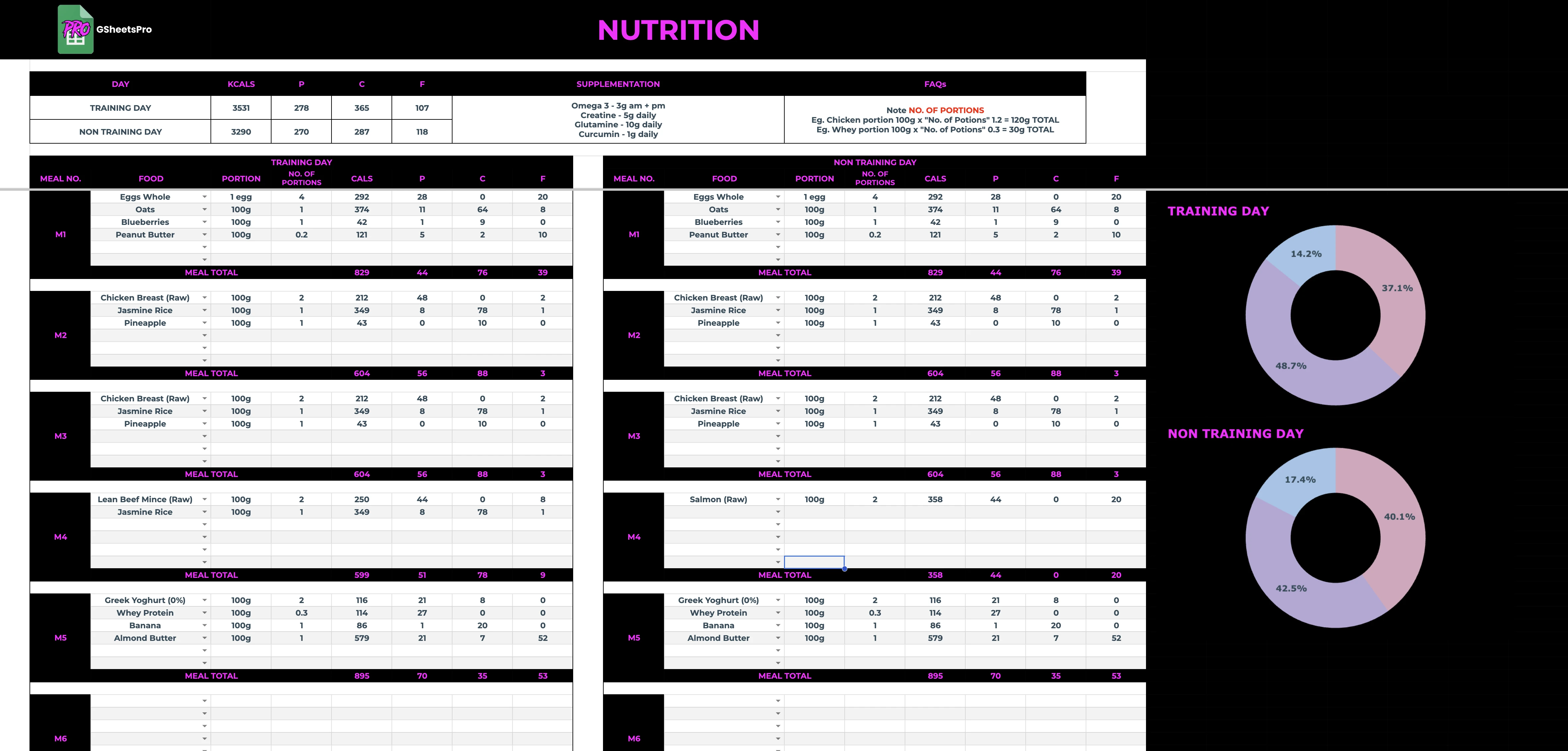
Included in GSheetsPro: Macro and meal plan templates, per-meal and per-day macro calculations, and an editable 200+ food database. The included nutrition workflow pulls plan data from the food list.
If you build it yourself: Start with a client's stats (weight, height, age, activity level and goal), then define how your sheet calculates calorie and macronutrient targets.
Why you need it: Calculating macros by hand for every client (and recalculating every time they hit a plateau) is tedious and error-prone. One wrong number and your credibility takes a hit.
Example inputs and formulas:
- Input fields: Bodyweight (kg/lbs toggle), Height, Age, Sex, Activity Multiplier (dropdown: sedentary through to very active), Goal (fat loss / maintenance / muscle gain)
- Calculation engine: Mifflin-St Jeor for BMR, activity multiplier for TDEE, then goal-specific deficit or surplus percentages. Use
IFandVLOOKUPto auto-select multipliers from a reference table - Output columns: Training Day Calories, Rest Day Calories, Protein (g), Carbs (g), Fat (g), Fibre Target (g)
- Refeed logic: A toggle that automatically calculates higher-carb refeed day macros based on the client's current deficit
DIY benefit: Update one input and the connected targets recalculate without rebuilding the plan by hand.
For a focused build guide, see how to make a meal plan template in Google Sheets for fitness coaches.
3. Weekly Check-In System
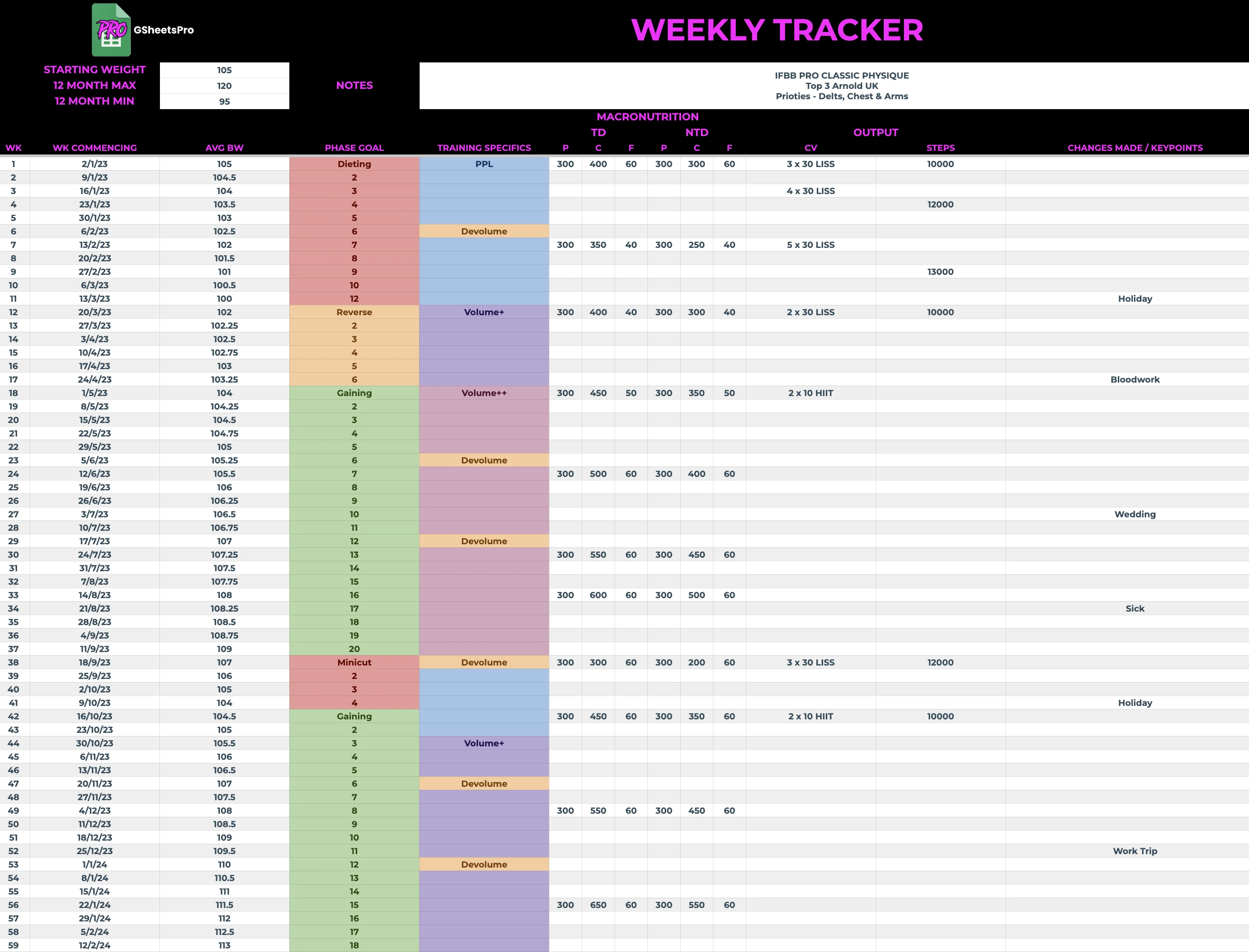
Use the body measurement tracker alongside weekly reviews.
Use the weekly check-in template for questions and scoring formulas.
Included in GSheetsPro: Beginner and advanced check-in sheets plus weekly progress tracking. The usage guide describes weekly client entries, duplicate weekly sheets and progress charts over time.
If you build it yourself: Use a consistent weekly record for weight, photos, adherence, energy, sleep and stress. If you connect a Google Form yourself, send responses to a tracking sheet and add trend analysis.
Why you need it: Check-ins are the backbone of online coaching. Without a system, responses arrive in random formats across email, WhatsApp, and DMs. You waste time chasing, reformatting, and trying to spot patterns manually.
Example fields and formulas:
- Client-facing fields: Week Number, Bodyweight, Average Daily Calories, Protein Hit (Y/N), Training Sessions Completed, Sleep Quality (1-10), Stress Level (1-10), Energy (1-10), Wins This Week, Struggles This Week
- Coach-side dashboard: Rolling 4-week averages for weight, calories, and adherence. Use
AVERAGEwithOFFSETfor rolling windows. Conditional formatting flags any metric that drops below threshold (e.g., sleep under 5 for two consecutive weeks) - Trend charts: Embedded
SPARKLINEor linked Charts for bodyweight, compliance, and subjective wellbeing over the full coaching period - Auto-generated summary: A formula-driven text block that reads: "Weight trend: [up/down/stable]. Adherence: [X]%. Flag: [sleep declining]." This gives you a quick snapshot before you record your Loom reply
DIY benefit: Responses land in one consistent structure, ready to review without reformatting messages from different channels.
4. Training Program Builder
Download the free Google Sheets workout template CSV tabs.
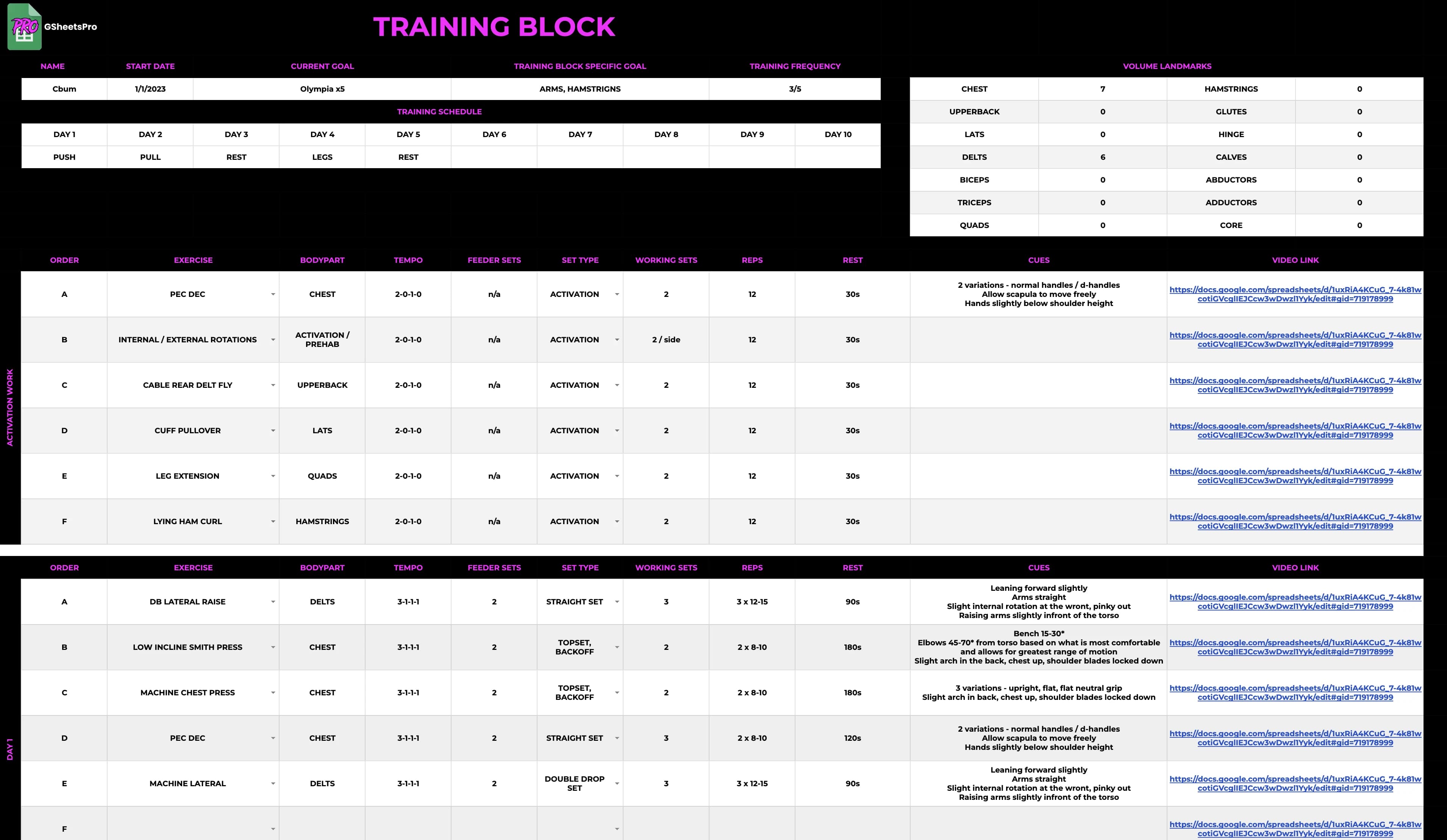
Included in GSheetsPro: Training plans, an exercise library, a client logbook and volume tracking. The usage guide says total volume calculates in the training plan and logbook, while exercise cues and videos can feed into the plan.
If you build it yourself: Use a library-driven programme design tool where you select exercises from a database, assign sets, reps, RPE and tempo, then create a client-ready training plan.
Why you need it: Writing programs from scratch every mesocycle is one of the biggest time sinks in coaching. A template with an exercise library and auto-progression means you design once and the system handles the increments.
Example fields and formulas:
- Exercise library tab: Exercise Name, Primary Muscle Group, Equipment Required, Movement Pattern (push / pull / hinge / squat / carry), Video Link. Aim for 150+ exercises to cover most programming needs
- Program builder tab: Day, Order, Exercise (dropdown from library), Sets, Reps, RPE / RIR, Tempo, Rest Period, Coach Notes
- Progressive overload engine: A
Week-over-Weekcolumn that auto-calculates load increases based on your chosen progression model (e.g., +2.5% on compounds, +1 rep on isolations). UseIFlogic tied to the client's training log to determine whether progression is warranted - Volume tracking: Auto-summing weekly sets per muscle group with a target range (e.g., 10-20 sets for quads). Conditional formatting turns the cell amber when approaching the upper limit and red when it exceeds it
- Deload logic: Editable, coach-set changes for recovery weeks; test any volume or load adjustment against the individual programme
DIY benefit: Reuse your exercise library and progression logic instead of rebuilding every programme from a blank sheet.
5. Business Analytics Dashboard
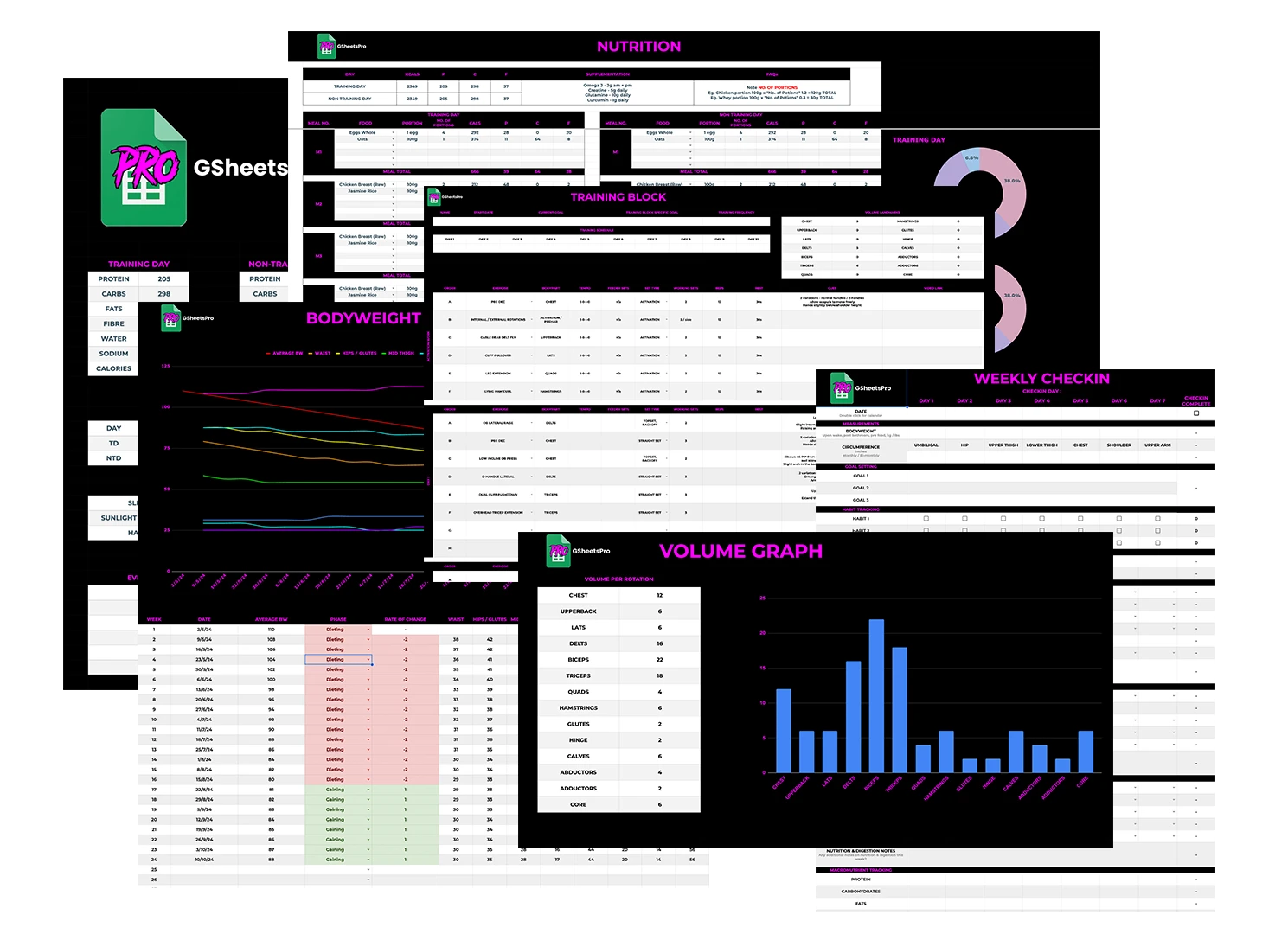
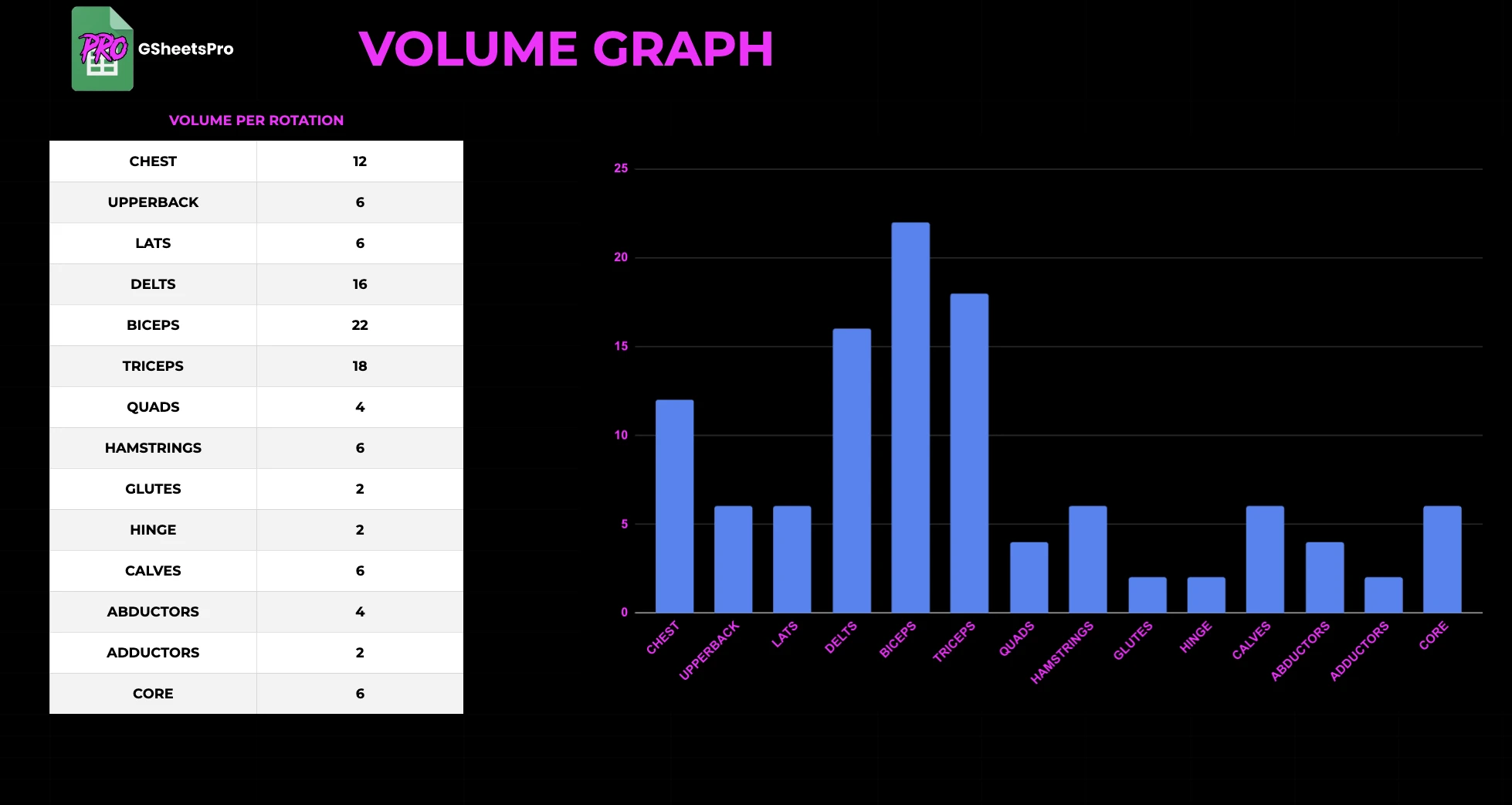
DIY idea: Build a separate business dashboard that pulls data from your other sheets into one overview. GSheetsPro's included preview below shows training volume and progress analytics. The revenue, retention and lead fields in this section are ideas for your own Google Sheet.
If you build it yourself: Pull data from your other four templates and consolidate it into a single business overview: revenue, client count, retention rate, average lifetime value, capacity and lead pipeline.
Why you need it: You are not just a coach. You are running a business. If you do not know your churn rate, your cost per acquisition, or how close you are to capacity, you are flying blind. This template turns scattered data into decisions.
Example fields and formulas:
- Revenue section: Monthly Recurring Revenue (MRR), Average Revenue Per Client, Total Revenue This Month, Revenue vs. Target (%). Use
SUMIFSto pull from your client management dashboard based on active status and package tier - Retention metrics: Churn Rate (%), Average Client Lifespan (months), Renewal Rate (%), Clients Lost This Month.
COUNTIFSpaired with date ranges gives you month-over-month retention without any manual counting - Capacity planning: Current Clients, Max Capacity, Utilisation (%), Projected Revenue at Full Capacity. A simple division formula that tells you exactly how much room you have to grow before you need to hire or restructure
- Lead pipeline: Leads This Month, Discovery Calls Booked, Close Rate (%), Cost Per Acquisition. Track where every client came from (Instagram, referral, podcast) so you know where to double down
- KPI trends: Monthly
SPARKLINEcharts for MRR, churn, and client count so you can spot trends before they become problems
DIY benefit: Your key numbers stay in one view instead of being rebuilt manually whenever you need to make a decision.
Personal Trainer Google Sheets Template: What to Include
A personal trainer's Google Sheets template needs slightly different tabs from an online-only coach. In-person trainers also track sessions, and hybrid trainers need both. A useful personal trainer template includes:
- Client profile: goals, training history, injuries, PAR-Q status and emergency contact
- Session log: date, session number, package balance (for example sessions left in a 10-pack) and attendance
- Training plan: the programme for the current block, using the structure in section 4
- Progress record: bodyweight, measurements, key lifts and photo dates
- Nutrition targets: calories and macros if you provide nutrition guidance, using section 2
A simple formula such as =C2-COUNTIF(Sessions!B:B,A2) shows how many sessions a client has left, where C2 is the sessions bought and Sessions!B:B lists the client name for each completed session. For a full roster layout, see the client tracking spreadsheet for personal trainers.
Coaching Sheet Template Checklist
Before you share any coach spreadsheet or coaching sheet template with a client, check it against this list:
- One file per client. Keep each client's data in a separate file so sharing permissions stay simple.
- Coach-only notes elsewhere. Hidden tabs are still visible to anyone with edit access. Keep private notes in a separate file.
- Clear input cells. Colour the cells a client can edit, and protect formula cells.
- Phone test. Open the file in the Google Sheets mobile app and complete one check-in.
- Master copy. Keep one untouched master and duplicate it for each new client.
The real cost of building these yourself
Each template can take hours to design, build, test, format, and connect. Across five systems, that becomes a substantial implementation project before you coach another client.
It is easy to start template one, get halfway through, and leave it unfinished when client work takes priority. The cost is not only the build time. It is staying with a fragmented system for longer than you planned.
The first four core areas are included in GSheetsPro for £199. The package includes a client dashboard, macro and meal plan templates, beginner and advanced check-in sheets, training plans and an exercise library, a weekly progress tracker, a prep and lifestyle timeline, an editable 200+ food database, a setup tutorial, 24/7 support and lifetime updates.
The business analytics fields in section 5, and the extra formulas marked as DIY, are ideas for your own Google Sheets setup. Build those yourself from the structure above, or review the complete GSheetsPro system.
Explore the macro calculator sheet, meal plan guide and weekly check-in template.
Free Google Sheets templates for coaches
Browse all free templates. These are CSV starter layouts; import them into your own files and review the formulas.
- Google Sheets Workout Template for Coaches (Free CSV)
- Body Measurement Tracker (Free Google Sheets Template)
- Habit Tracker for Google Sheets (Free Client Template)
- Meal Plan Template for Google Sheets (Free CSV)
- Online Coaching Check-In Template (Free CSV)
- Client Tracking Spreadsheet (Free Coach CSV)
- Macro Calculator Google Sheets Template (Free CSV)
- PAR-Q Form for Personal Trainers: Free Intake Template
- Personal Trainer Forms: Waiver, Contract & Intake
- Personal Trainer Invoice Template (Free Google Sheets)